
Every rental contract workflow reduces to five steps: trigger, generate, populate, route and sign, then file and notify. Wire those five steps together with your property management system as the source of truth, a template engine, and a compliant e-signature platform, and a lease that used to take days to execute can close in minutes instead.
Before you build anything, get four things settled: the trigger event, the fields your template needs mapped, the signer order, and where the executed file lands for retention. That’s your starter checklist. Everything else is refinement.
- Trigger event defined (usually applicant approval)
- Template fields mapped to PMS data
- Signer order and conditional attachments set
- Retention location and audit log confirmed
Pro Tip: Place your first automation trigger at the “applicant approved” status change, not at “application submitted.” Firing too early means chasing signatures on deals that fall through, which wastes reminder cycles and confuses everyone on conditional attachments like guarantor forms.
Key Takeaways
A compliant rental contract workflow runs on three connected parts, PMS, template engine, and e-signature platform, and turns a multi-day signing cycle into one that closes the same day.
| Point | Details |
|---|---|
| Five-step workflow | Trigger, select template, auto-populate, route and sign, then file and notify. |
| AES is the legal baseline | Use Advanced Electronic Signature for standard leases; reserve QES for high-value or notarized acts. |
| Audit trail is non-optional | Capture timestamps, IP and device metadata, and version history on every signature. |
| Test before scaling | Run one canary lease through the full workflow before rolling it out portfolio-wide. |
| Managed alternative exists | Costacambrils handles the full rental process, legal review through execution, for owners who prefer a single vendor over building the workflow themselves. |
Table of Contents
- What Does a Rental Contract Workflow Actually Cover?
- What Are the 5 Steps of a Rental Contract Workflow?
- Which Contract Clauses and Dates Must the Template Auto-Populate?
- What Features Should You Look for in Rental Contract Software?
- Which E-Signature Level Is Legally Valid for a Lease?
- How Do You Implement a Rental Contract Workflow?
- What Common Mistakes Derail a Rental Contract Workflow?
- How Should You Handle GDPR and Data Privacy in Rental Contracts?
- When Should You Hire a Managed Property Partner Instead?
- Frequently Asked Questions
- Sources
What Does a Rental Contract Workflow Actually Cover?
A rental contract workflow is the full lifecycle of a lease document: creation, signature, secure storage, and every downstream event that document triggers, from renewal reminders to termination notices to billing kickoffs. It’s not just “getting a signature.” It’s the connective tissue between your applicant data and the operational events that fire off that signed document for years afterward.
Done right, it delivers faster move-ins, fewer transcription errors, and an audit trail you can actually produce on demand instead of digging through email threads. Done poorly, you get mismatched rent figures, missed renewal windows, and signed leases scattered across inboxes.
The workflow touches several moving parts:
- Applicant and unit data pulled from your PMS
- Template rules that decide which clauses apply
- Signer roles (tenant, guarantor, co-signer, landlord)
- Reminder cadence for non-signers
- Filing back into the PMS with a retention timeline attached
What Are the 5 Steps of a Rental Contract Workflow?
Step 1: Trigger on approval. The moment an applicant status flips to “approved” in your PMS, the workflow should fire automatically. Manually, this step depends on someone remembering to start the paperwork, which is where leases sit untouched over a weekend.
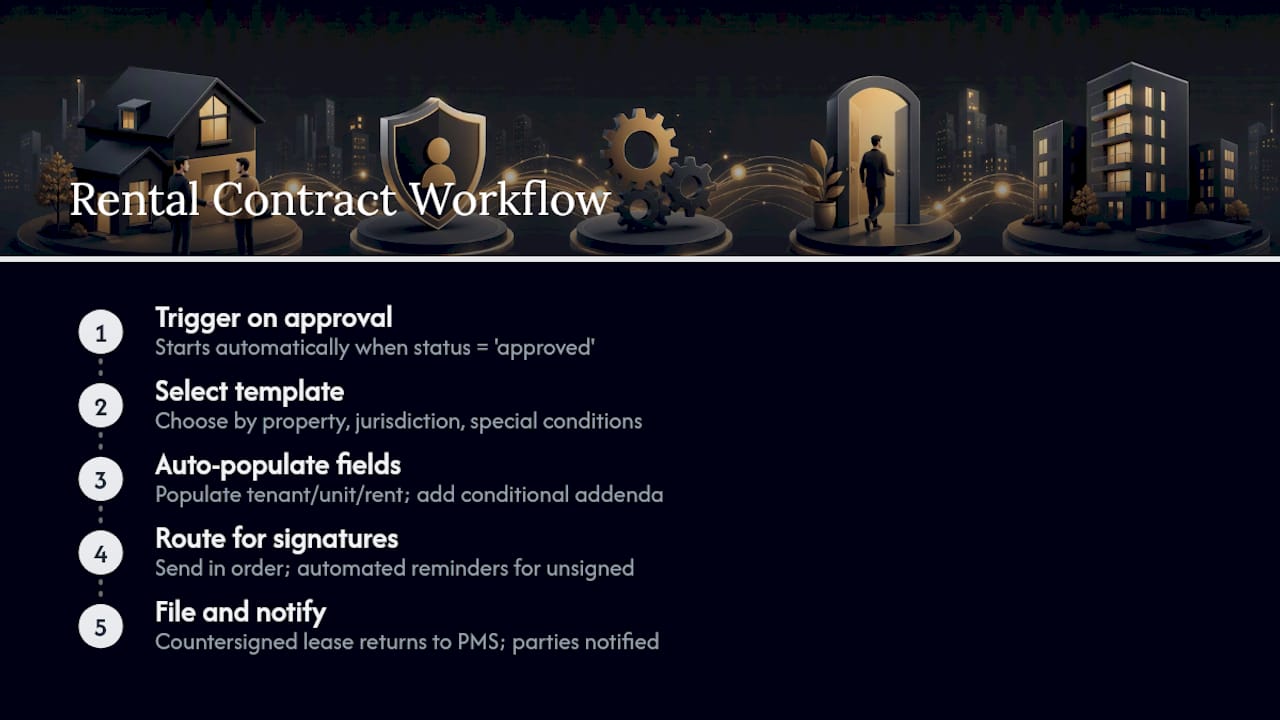
Step 2: Select the template. The system picks the correct lease template based on property type, jurisdiction, and any special conditions (pets, furnished units, corporate tenants). Verify the correct annex set attaches here, since a wrong template selection is the single most common mapping error property managers report.
Step 3: Auto-populate. Tenant names, unit address, rent, deposit, and term dates pull directly from PMS fields into the template. No retyping means no transposed digits on a rent figure. This is also where you branch: a guarantor requirement or pet addendum gets added conditionally based on application data, not manually attached later.
Step 4: Route for signatures. Signers receive the document in a defined order, typically tenant first, then guarantor if required, then the landlord or property manager last. Automated reminders chase anyone who hasn’t signed within a set window.
Step 5: File and notify. The countersigned lease routes back into the PMS automatically, tagged with retention metadata, and relevant parties get notified that the lease is active.
Manually, this whole cycle often stretches across several days as documents wait in inboxes for the next person to notice them. Automated, the same cycle can close the same day, sometimes within minutes of the last signature landing.
Pro Tip: Before rolling this out portfolio-wide, run one “canary” lease through the full workflow and log every field mapping, signer response time, and attachment trigger. Catching a broken mapping on one test lease costs you nothing; catching it after 40 live leases costs you a very uncomfortable cleanup week.
Which Contract Clauses and Dates Must the Template Auto-Populate?
Templates fail when they skip fields that seem obvious until a dispute makes them matter. At minimum, map: parties and unit details, lease term, rent amount, deposit amount, recurring charges, payment schedule, termination conditions, renewal notice period, and any inventory or inspection report reference.
Lifecycle dates need their own tracking layer, separate from the static clauses:
- Lease start and end dates
- Renewal notice window (often 30 to 90 days before expiry)
- Scheduled inspection dates
- Deposit return deadline after move-out
Pro Tip: Handle jurisdiction-specific disclosures as conditional attachments tied to property location, not as edits to your master template. That way a required local annex applies automatically to the right units without someone hand-editing a base contract and accidentally breaking it for everyone else.
What Features Should You Look for in Rental Contract Software?
Evaluate any tool on eight axes, not on brand recognition. Each one maps to a real failure mode you’ll hit eventually if you skip it.
E-signature level matters because a dispute over a high-value commercial lease needs more than a basic checkbox signature to hold up. PMS and API integrations matter because re-entering data manually reintroduces the errors automation was supposed to eliminate. Template and variable auto-population separates a real workflow tool from a glorified PDF editor. Automated routing with conditional branching handles the guarantor-and-pet-addendum problem without a human tracking exceptions in a spreadsheet. Audit trail and evidence export is what saves you when a tenant disputes signing altogether. Localization matters if you operate across regions with different disclosure requirements. User roles and permissions keep a leasing agent from editing clauses only a manager should touch. And the pricing model, per-signature, per-user, or flat subscription, determines whether the tool scales sensibly as your portfolio grows.
| Capability Category | What It Should Deliver |
|---|---|
| E-signature level | Supports AES at minimum, QES available for high-value leases |
| PMS/API integration | Prebuilt connectors, not just CSV exports |
| Template automation | Field mapping without manual re-entry |
| Routing and reminders | Conditional branching for guarantors, staged reminder cadence |
| Audit trail | Timestamped, exportable logs with IP and device metadata |
| Localization | Region-specific legal templates and language support |
| Permissions | Role-based access separating agents from admins |
| Pricing | Transparent per-signature or per-user cost, no hidden tiers |
Before signing a contract with any provider, confirm these minimums:
- AES-level signing supported out of the box
- Immutable, exportable audit logs
- Cryptographic timestamping on every signature event
- No vendor lock-in that traps your signed documents on their platform
Tools like Bidrento build e-signing directly into the PMS, which some teams prefer over stitching together separate vendors. Others, including Buildium and AppFolio, focus on operations and accounting with e-signature as a connected feature rather than the core product. Orchestration layers like US Tech Automations take a different approach entirely: they connect your existing PMS to document generation and signature tools without requiring you to replace anything, which matters if you’ve already invested in a PMS you don’t want to abandon.
Which E-Signature Level Is Legally Valid for a Lease?
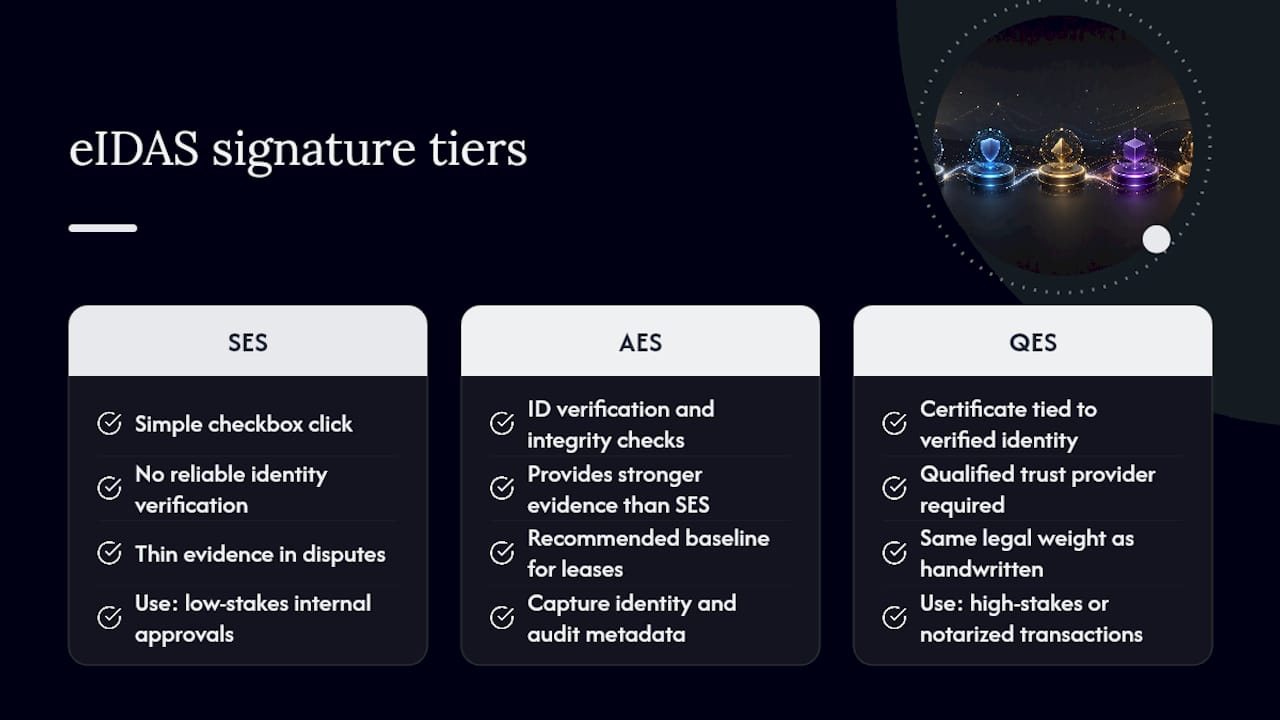
Advanced Electronic Signature (AES) is the recommended baseline for residential and commercial leases under eIDAS. Qualified Electronic Signature (QES) sits above it and carries the same legal weight as a handwritten signature, which matters for high-stakes or notarized transactions.
eIDAS defines three tiers. Simple Electronic Signature (SES) is little more than a checkbox click, fine for low-stakes internal approvals but thin evidence in a dispute. AES adds real identity verification and document integrity checks, which is why it’s widely recommended for leases. QES requires a qualified trust service provider and a certificate tied to verified identity, giving it the strongest probative value of the three.
Your platform should automatically capture identity verification artifacts, a timestamp, the signer’s IP and device metadata, full version history, and store the signed document in a certified archive. Skip any of these and you’ve got a signature that’s technically valid but painful to defend if challenged.
Regulation (EU) No 910/2014 sets the cross-border legal framework, but individual countries can layer on their own form requirements. France’s ALUR framework, for instance, explicitly recognizes AES for residential leases while reserving QES for higher-value acts, a pattern that repeats across other EU jurisdictions with local variations.
AES provides stronger identity verification and document integrity than SES; platforms should capture detailed signature metadata and maintain immutable audit logs to demonstrate compliance if challenged.
Pro Tip: For cross-border leases or anything involving a high-value property, default to QES or at minimum AES paired with a verified ID check, then archive the signed copy in a certified long-term storage format. The extra step at signing costs you almost nothing; a signature you can’t defend costs you the case.
How Do You Implement a Rental Contract Workflow?
Start with discovery. Map your current signing cycle end to end, note every manual handoff, and pick one document type, usually the standard residential lease, to automate first rather than trying to convert your entire template library at once.
Keep the PMS as your single source of truth throughout. Map its fields to your templates, then define the trigger events that fire the workflow, typically an applicant status change to “approved.” A three-part architecture built on PMS, template engine, and e-signature platform is what makes the whole thing hold together.
Before going live, run through this testing sequence:
- Verify field mapping against a sample lease
- Test signer order with a mock multi-party lease
- Trigger conditional attachments (guarantor, pet addendum) and confirm they attach correctly
- Test reminder cadence timing
- Confirm the audit log captures every required metadata point
- Document a fallback manual process in case the automation fails
Most teams reach their first live automated cycle within hours to a few days of setup. Full portfolio rollout, across every property type and template variant, typically takes a few weeks as edge cases surface and get resolved.
Assign clear owners: technical staff handle the integration and field mapping, operations owns signer sequencing and reminder cadence, and legal signs off on clause language and signature tier requirements.
Pro Tip: Run your pilot in a staging environment with a canary lease before touching production data. It catches broken mappings without putting a real tenant’s paperwork at risk.
What Common Mistakes Derail a Rental Contract Workflow?
Most rollouts stumble on the same handful of errors: mismatched field mapping, wrong signer order, missing annexes for specific property types, executed copies filed only in someone’s email inbox, and renewal triggers that never quite got defined clearly enough to fire.
Watch for these compliance red flags before they become a legal problem: no timestamped audit trail, relying on SES for a high-stakes lease that warranted AES or QES, a retention policy nobody’s actually documented, or an inability to export evidence when a dispute lands on your desk.
Run this checklist before go-live: field mapping verified against sample leases, audit log tested end to end, retention policy confirmed and documented, and legal sign-off obtained on your chosen signature tier.
Pro Tip: Stage renewal reminders at 90, 60, and 30 days before lease expiry rather than one last-minute notice. That spacing gives you enough runway for inspections and negotiation before a unit sits vacant.
How Should You Handle GDPR and Data Privacy in Rental Contracts?
A rental contract workflow handles some of the most sensitive personal data a property manager touches: full names, national ID or passport numbers, income details, bank account information for deposits, and sometimes guarantor financial data too. Under GDPR, that data needs a documented legal basis for processing, typically contract performance, and it can’t be retained indefinitely just because it’s convenient to keep everything forever.
Set a clear retention policy tied to your lease lifecycle rather than an arbitrary “keep everything” default. Most jurisdictions expect landlords to retain executed leases for a defined period after tenancy ends, often tied to statute of limitations for contract disputes, then delete or anonymize the data afterward. Your workflow should tag documents with a retention expiry date at the filing step, not leave that decision to someone remembering years later.
Storage location matters too. If your e-signature platform or PMS stores data outside the EU, confirm it has appropriate safeguards, standard contractual clauses or an adequacy decision, since cross-border transfer of tenant personal data without those protections creates real exposure. Access controls matter just as much as storage: not everyone on your team needs to see a tenant’s bank details, so role-based permissions should restrict financial and ID fields to the staff who actually need them for the transaction.
Finally, build in a process for data subject access requests. A tenant asking what personal data you hold and how it’s used is a routine GDPR right, and a workflow with clean, centralized records answers that request in minutes instead of triggering a scramble through old files.
What adoption actually looks like on the ground
In practice, the one task that stays manual is the approval decision. Everything downstream runs on autopilot. Teams that start with one property type usually expand to the full portfolio within a few automation cycles once the mapping holds.
When Should You Hire a Managed Property Partner Instead?
Building and maintaining this workflow yourself makes sense when you have the internal capacity for it. It stops making sense once you’re spending more hours managing the automation than the automation saves you.
Consider a managed partner when your portfolio has grown past what one or two people can oversee, when you lack the internal integration capacity to connect a PMS to a template engine and an e-signature platform, or when you need legal compliance handled by people who already know the local requirements cold rather than researching them as you go.
Costacambrils runs the entire rental process for owners in Cambrils and the surrounding Costa Dorada area, from legal review through contract execution and ongoing property management, so you’re not the one building or babysitting a workflow at all. If you own an exclusive property in the region and want that operational load handled by a single team instead of stitched together across vendors, the rental process guide walks through exactly how the service works and what it covers.
Frequently Asked Questions
What is a rental contract workflow?
It’s the full process a lease document moves through, from creation and data population through signature, filing, and the lifecycle events that follow, like renewal reminders and termination notices.
Do I need to replace my property management system to automate signing?
No. Orchestration tools can connect your existing PMS, template engine, and e-signature platform without requiring you to switch systems.
Is a basic electronic signature legally valid for a lease?
It can be, but AES is the recommended baseline for residential and commercial leases because it verifies signer identity and document integrity far more reliably than a simple click-to-sign.
How long does it take to implement an automated rental contract workflow?
A first live automated cycle often runs within hours to a few days of setup; full rollout across a portfolio typically takes a few weeks as edge cases get resolved.
What’s the biggest mistake teams make when automating this process?
Skipping the test phase. Running a canary lease through the full workflow before scaling catches mapping errors that are cheap to fix early and expensive to fix after dozens of live leases.
Sources
- Electronic signatures for individuals in Europe: eIDAS practical guide
- Regulation (EU) No 910/2014 (eIDAS)
- A Simple Guide to European Electronic Signature Laws | Ironclad
- Contract Signing for Property Managers: 7 Steps 2026
Recommended
- Property Management Workflow: A 2026 Guide for Landlords – Inmobiliaria Costa Cambrils
- How to Negotiate Rental Contracts: Scripts & Checklist – Inmobiliaria Costa Cambrils
- What Is a Rental Contract? A Guide for Renters and Investors – Inmobiliaria Costa Cambrils
- Real Estate Legal Process Workflow: A Practitioner’s Guide – Inmobiliaria Costa Cambrils